How to Fix Verification Problems in GB WhatsApp
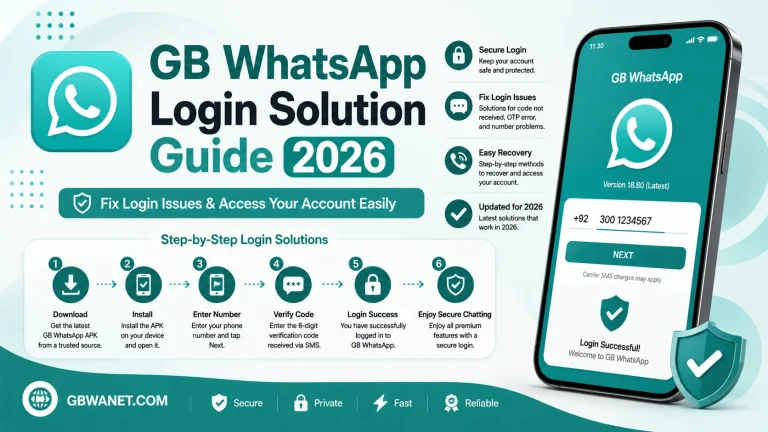
If GB WhatsApp is not verifying your phone number, first check that you entered the correct number, use a stable internet connection, request a new verification code, and update to the latest version of the app. Most verification issues are caused by incorrect information, network problems, or an outdated APK.
Note: GB WhatsApp is an unofficial version of WhatsApp. Verification may fail if the app version is outdated or no longer compatible.
Common Reasons for Verification Failure
Verification problems can happen because of:
- Incorrect phone number
- Wrong country code
- Poor internet connection
- Delayed SMS verification code
- Expired OTP
- Outdated GB WhatsApp version
How to Fix Verification Problems
1. Check Your Phone Number
Make sure you entered the correct mobile number and selected the right country code.
2. Use a Stable Internet Connection
Connect to a reliable Wi-Fi or mobile data network before requesting the verification code.
3. Request a New Verification Code
If the code expires or does not arrive, wait a few minutes and request a new one.
4. Update GB WhatsApp
Install the latest version of GB WhatsApp to improve compatibility and reduce verification errors.
5. Restart Your Device
Restart your phone and try the verification process again.
6. Clear the App Cache
Go to Settings > Apps > GB WhatsApp > Storage and tap Clear Cache. Then reopen the app.
7. Try Voice Verification
If SMS verification is unavailable, use the voice call option if it appears.
Common Verification Errors
| Problem | Solution |
|---|---|
| OTP not received | Check your network and request another code. |
| Invalid verification code | Enter the latest OTP received. |
| Verification failed | Confirm your phone number and country code. |
| Code expired | Request a new verification code. |
| App stuck on verification | Restart the app or update to the latest version. |
Tips to Avoid Verification Issues
- Use the latest GB WhatsApp version.
- Enter your phone number carefully.
- Keep a stable internet connection.
- Wait for the countdown before requesting another OTP.
- Restart your device if verification is delayed.
Frequently Asked Questions
Why am I not receiving the verification code?
This can happen because of network issues, an incorrect phone number, or delayed SMS delivery.
How long does verification take?
Most users receive the verification code within a few minutes.
Can I request another OTP?
Yes. After the timer ends, you can request a new verification code.
Does updating GB WhatsApp help?
Yes. Using the latest version can fix compatibility issues that may prevent successful verification.
Conclusion
Most GB WhatsApp verification problems can be solved by checking your phone number, using a stable internet connection, requesting a new verification code, and updating the app. If the issue continues, restart your device, clear the app cache, and try the verification process again.